Adding Firebase to your web application.

I am a innovative software developer and technical lead with demonstrated history in project management, web applications development, integration and service delivery, I have a solid understanding of object oriented design & analysis and software development life cycle to develop and maintain quality softwares.
Tech stacks: C#.net, Javascript (VanillaJs & VueJs), Php, Vb.net, Bootstrap, Foundation, WordPress, SQL, Unix, Git, heroku etc.
This is the first of the many beginner friendly tutorials i will be sharing on firebase for web applications. In this post, i am going to show you how to add firebase to your web application.
Before you begin
- Install your preferred editor or IDE.
- Open your web project.
- Sign into firebase using your Google account.
create a firebase project
To create a firebase project visit https://console.firebase.google.com and click on Add project, follow the on-screen process to finish adding your project.

After a successful project creation you’ll land on a page similar to this, click continue to finish the process.

Add firebase to your web application.
After creating a project successfully, it’s time to add firebase to your web application.
On this page click on the web icon (</>) to begin the setup workflow.

give your app a nickname (can be any name of your choice) and click on register. Be sure to check the checkbox that says "Also setup firebase hosting for this app" because we will need need it in the future.
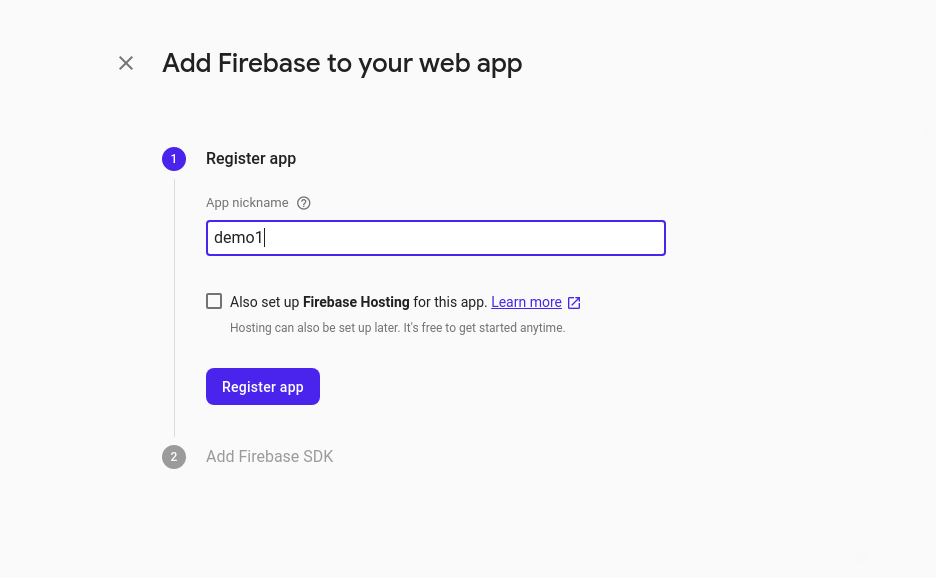
Finally add the firebase SDK and Initialize firebase in your web app. Copy the firebase SDK code (scripts) and paste it at the bottom before the closing body tag </body> of your html document.
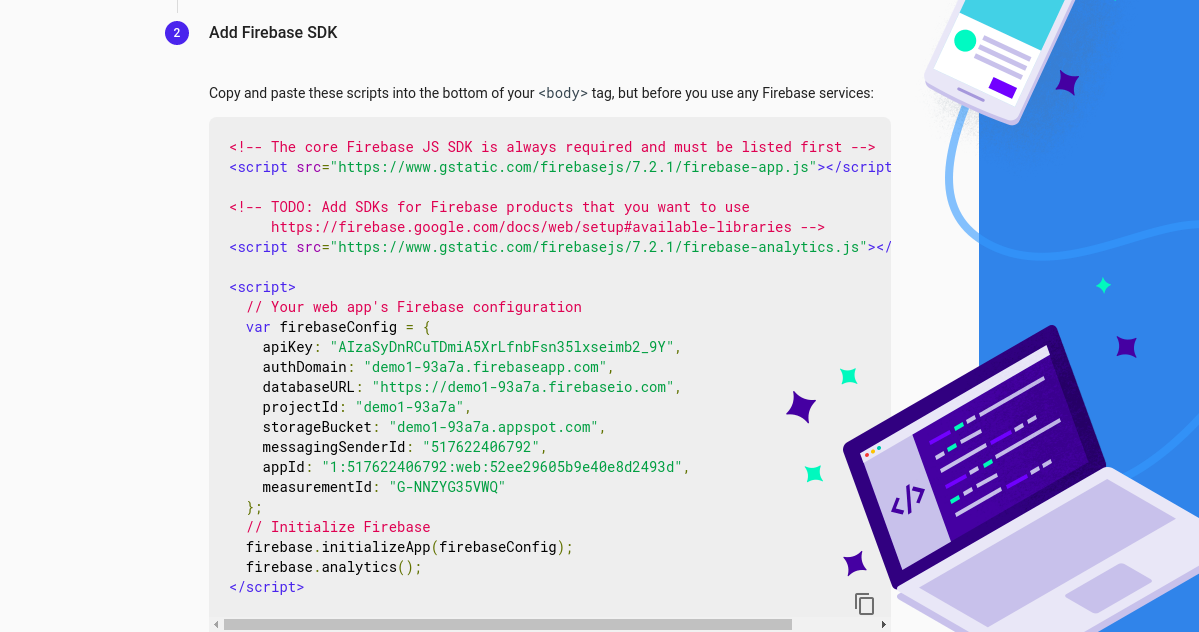
The final body section of your html document should look like the snippet below.
<body>

<h1>HELLO FIREBASE</h1>

<script src="https://www.gstatic.com/firebasejs/7.2.1/firebase-app.js"></script>

<script src="https://www.gstatic.com/firebasejs/7.2.1/firebase-analytics.js"></script>

<script>
  // Your web app's Firebase configuration
  var firebaseConfig = {
    apiKey: "AIzaSyDnRCuTDmiA5XrLfnbFsn35lxseimb2_9Y",
    authDomain: "demo1-93a7a.firebaseapp.com",
    databaseURL: "https://demo1-93a7a.firebaseio.com",
    projectId: "demo1-93a7a",
    storageBucket: "demo1-93a7a.appspot.com",
    messagingSenderId: "517622406792",
    appId: "1:517622406792:web:52ee29605b9e40e8d2493d",
    measurementId: "G-NNZYG35VWQ"
  };
  // Initialize Firebase
  firebase.initializeApp(firebaseConfig);
</script>
</body>
CONGRATULATIONS you have successfully added firebase to your web application. In the next post we are going to learn how to deploy our web applications to firebase hosting.
Was this post helpful? leave your thoughts and questions in the comment section.